
Combining multi-architecture static libraries (lipo & libtool - OS X)
Claudiu Ursache has a nice blog post detailing the command sequence to combine a set of multi-architecture (‘fat’) static libraries into a single static library. I needed to follow this technique for a recent project… and of course preferred to invest more time on the front-side to develop a small tool to automate the process.
This bash script combines all of the .a libraries in a given directory into a single library. It is hardcoded to use the i386, armv7, and armv7s architectures; this can easily be changed at the top, or it may be left as an exercise for the reader to determine the common set of architectures amongst the files. The script takes a single argument, which is the name of the final, combined library to be created.
Another useful script I wrote while working on the same project is a convenient way to combine .a libraries compiled separately into fat binaries. For example, it’s difficult to convince Xcode to build for both i386 (iOS Simulator) and arm (iOS Device) simultaneously. Building each separately, then running this script, produces fat (universal) binaries.
A fond farewell to the iPhone 3G and iPod Touch 2nd Generation
With the release of the iPhone 5 and iOS 6, Apple's developer tools no longer support building apps that can run on the iPhone 3G, the iPod Touch 2nd Generation, and earlier iOS devices. Apple has provided to each developer a choice: Either move forward with support for new devices while dropping the oldest ones, or continue to support the oldest but neglect the newest.
We have always taken significant care to provide the best possible support for older devices. I know that many users keep an older iPod Touch by the couch just to use it as a remote control, and that Rowmote is the cornerstone of many media center setups.
Unfortunately, the long and short of it is that there is not a viable business model in neglecting potential new customers when no continued financial support is expected from existing ones. Rowmote does not use a subscription model, nor is it ad supported, so a customer's purchase is a one-time transaction -- a transaction in exchange for which we provide support for the lifetime of the app. Put that way, I hope you can agree that up to several years of great use at a cost of $0.99 or $4.99 is still a fantastic deal.
New Applications menu: Rowmote & Rowmote Pro 3.6
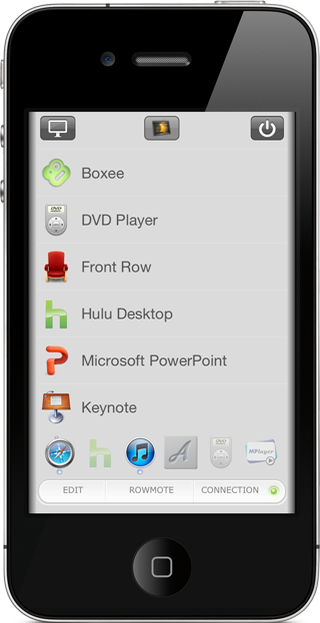
We're proud to announce that Rowmote and Rowmote Pro 3.6 were approved today. Along with support for a few great new applications, including Rdio and Ecoute, the new version sports a redesign of the Applications menu. Display, computer-wide, and application-specific commands are split out into easy-access popup menus from simple buttons. The applications list now shows only installed applications on the connected Mac (rather than showing every application that Rowmote knows about, even if each is not installed, as was done previously). Icons are pulled from the Mac, too, so that the list can be quickly scanned by image rather than just name.
Learn more about Rowmote and Rowmote Pro on their application page.
Apps For Water: Help bring clean, safe water to developing nations
On December 20, 2011, all proceeds from sales of Rowmote, the Rowmote Pro Upgrade, and Rowmote Pro will be donated to charity: water as part of the Apps For Water indie developer charity effort.
Thanks for your continued support, and please check out the Apps For Water site to learn more about the other excellent apps involved in this charity effort.
Rowmote Pro 3.4 Released
We're very proud to announce the release of Rowmote Pro 3.4. This is a feature release with some very cool improvements to our Mac and Apple TV remote control.
An intelligent 'Pause on Call' function for the iPhone now lets Rowmote pause your Mac's movie or music when you answer a phone call while Rowmote is running.
The iPhone or iPod Touch screen can be turned off automatically when it is face down through the use of the proximity sensor - perfect for conserving battery.
Those devices also sport a Mute button on the main remote, and all iOS devices can control your Mac's volume through the hardware volume buttons on the side. Intuitive audio control without cluttering the interface.
By popular demand, the iPad now has a full-screen multitouch trackpad and much better trackpad+keyboard handling when holding the iPad in landscape orientation.
Please update via the App Store. You'll automatically be prompted to update Rowmote Helper when you connect with the new version; the Sparkle automated installation process will do the rest.
Japanese Earthquake and Tsunami
Our thoughts are with the Japanese as they deal with the aftermath of the natural disasters of this week.
All proceeds from Regular Rate and Rhythm's medical apps this weekend (Saturday 3/12/2011 0000 PST through Sunday 3/13/2011 2399 PST) will be donated to Save The Children's "Japan Earthquake Tsunami Children in Emergency Fund."
I encourage you to provide what you can to the charity of your choice. If you're in the US, you can text 'REDCROSS' to 90999 to instantly donate $10 from your mobile phone.
Rowmote Pro for 2nd Generation Apple TV!
We're very proud to announce that Rowmote and Rowmote Pro can now control the 2nd generation Apple TV! This marks the first time that an iPhone, iPod Touch, or iPad can control all original and third-party software available for the jailbroken Apple TV. The wireless keyboard of Rowmote Pro works flawlessly, too!
Installation instructions are available here. I look forward to any feedback.
Busy day of updates… and an interview
Updates to MediMath, Perfect IVF Wheel, and Rowmote Pro were approved by Apple today; check the App Store for details. The matching update for Rowmote remains in review.
An update to Conference Pad was submitted this evening, as well.
I have some great things in progress for Rowmote, and a set of new mnemonics coming down the review pipeline for Medical Mnemonics, too.
Finally: I was interviewed by iMedicalApps earlier this week regarding our experience so far with the Windows Phone 7 market, on which we're distributing versions of Medical Mnemonics and Perfect OB Wheel. I hope it's of interest to some of you!
Rowmote and Rowmote Pro 3.2 now available
FOR IMMEDIATE RELEASE
New Orleans, LA - Regular Rate and Rhythm Software has announced Rowmote Pro 3.2 for iPhone, iPod Touch, and iPad, a major update to their complete remote control solution for Mac OS X and Apple TV. Rowmote Pro emulates the Apple hardware remote control, providing application-specific controls through a consistent interface, while featuring a multitouch trackpad and keyboard.
New in the version 3.2 release, its trackpad sports true multitouch, with one, two, three, and four finger gestures - positioning it as a competitor to Apple's own Magic Trackpad for Mac users who own an iOS device, at just one-fourtheenth the cost. The Rowmote Pro keyboard continues to handle anything the device itself can - including accented characters and international layouts.
Rowmote Pro controls thirty popular applications, from music applications like iTunes and PandoraBoy to video players such as DVD Player, Hulu Desktop, Plex, and Front Row, to presentation tools such as Microsoft Powerpoint and Apple Keynote, precisely as the Apple hardware remote would. Its consistent, attractive interface makes it easy to manage a media center computer or a presentation. On the iPad, the central Gesture Pad provides intuitive no-look control via taps and swipes as well as access to the trackpad.
Rowmote Pro evolved from Rowmote for iPhone, iPod Touch, and iPad, which offers the same features except without keyboard and mouse support. An in-app upgrade path is available for Rowmote users who wish to add the Pro version's capabilities.
Device Requirements:
- iPhone, iPod Touch, or iPad with iOS version 3.0 or later.
- Three and four finger gestures require iOS 3.2 or later.
- The free Rowmote Helper software must be running on the Mac or Apple TV.
Pricing and Availability:
Rowmote Pro 3.2 is $4.99 (USD) and available worldwide exclusively through the App Store in the Utilities category.
Rowmote Helper 3.2: Temporary installation bug fixed
If you downloaded Rowmote Helper 3.2 between 5 PM and 11 PM CST (GMT -6) today, you found the installer claimed it needed no additional space to install and then didn't actually install anything. Sorry about that! It's fixed now. Please redownload and reinstall if you were affected during this window of time. :)
Handbrake, AppleTV, and batch conversion
I've been trying hard to get back into shape; part of my plan includes running. My exercise room features a treadmill, a wall-mounted TV, and an AppleTV. The iPod Touch comes with me and, via Rowmote, controls the AppleTV. I find it much easier to run while catching up on TV.
If I want to watch episodes for shows I have on my Mac, I need to convert them to the AppleTV movie format (MPEG-4) first so that iTunes will happily sync them to the aTV. Handbrake is a great, open source, free tool to perform that conversion, but its queueing system - for batch conversion of multiple files - is very cumbersome. Fortunately, the command line interface (CLI) version of Handbrake can do the job with just a touch of magic.
To convert a folder of movie files to the AppleTV format:
1. Download the HandbrakeCLI tool. I installed it to ~/bin but anywhere on your path will do.
2. Load Terminal and cd to the folder with your movie files.
3. Run the following one-line command:
for f in *; do HandBrakeCLI -i "$f" -o "~/Desktop/$f.mp4" --preset="AppleTV"; done
Rowmote for AppleTV: Fixed '@' bug
Rowmote Helper ATV 3.1 is now available from the Rowmote Apple TV Installation page. It fixes the recent bug in which typing the '@' key into certain third party applications such as Boxee or Firefox instead inserted a '2'.
Update instructions may be found on that page; an autoupdating system remains in development.
Rowmote for iPad 3.1: The Gesture Pad
Rowmote and Rowmote Pro 3.1 on the iPad introduce an exciting new feature, the Gesture Pad. Found in the center of the remote control screen, the Gesture Pad lets you control the computer using, as the name implies, gestures. This is a new level of no-look control over your Mac or Apple TV.
Flick your finger down to move down in a menu; hold it to scroll. Flick right to move forward a track, or hold it to the right to fast forward. A single tap is Play/Pause (or Select), while a two-finger tap is Menu (or Back).
In Rowmote Pro, the Gesture Pad can also be toggled to a standard trackpad by touching the mouse cursor icon in the corner; for the first time in Rowmote, your one-touch media controls, multitouch trackpad, and keyboard can all be easily managed on the same screen.
I hope you enjoy the new feature as much as I do :)
Note: Rowmote Pro 3.1 was approved today and displays as '3.0.8' in some of the iTunes and App Store screens; Rowmote 3.1 should follow shortly, as it's in review with Apple. You'll need to update to Rowmote Helper 3.1 – for which you'll be prompted automatically – to use the new features.
SQLite3, Full Text Search with FTS3, and iOS 4.0
Our iOS apps Med Mnemonics, Med Abbreviations, and ICD9 Consult handle huge amounts of data – 1500+ memory tricks and aides, 13,000+ medical abbreviations, and 17,000+ medical diagnosis codes respectively – and provide instantaneous search. The key to doing so is the FTS3 extension to SQLite3 which enables fast, indexed search.
While updating both apps to support the new features of iOS 4.0 by compiling against the iOS 4.0 SDK, I discovered that compiling a custom build of SQLite3 (in my case, to enable FTS3) led to massive breakage when running on iOS 3.2 or earlier. I could continue to just use the iOS 3.2 SDK, but that would mean no fast task switching, among other problems. No good!
The solution is to use the systemwide sqlite3 library and load FTS3 as an extension. To do so:
- Download the sqlite-fts3-extension project I created, which includes the necessary files from the sqlite3 project.
- Include the project in your own. Add it as a dependency for your own target (so it will be built automatically) and drag the sqlite-3.6.23.1-fts3-ext.a product to your Link Binary with Libraries phase.
- In the class file before you load the database, add:
#import "RRFTS3ExtensionLoader.h"
at the top and add:
[RRFTS3ExtensionLoader loadFTS3];
somewhere before the database is opened.
I hope that helps someone! This code, like sqlite3 itself, is released into the public domain. My thanks to Pascal Pfiffner for his help in working through this.
View Comments